Irrigation Product Listings & Reviews
Armada Technologies
Pro48 Solenoid Activator / Chatterbox
Pro210f Tone Probe
Pro48K Solenoid Activator/Chatterbox Kit
Armada Pro48 Solenoid Activator / Chatterbox
The Armada Technologies Pro48 Solenoid Activator / Chatterbox is a simple to use, portable, irrigation system tester. It performs the following functions:
- Tests valve circuit voltage and current output from an irrigation controller.
- Can be used to activate valve solenoids.
- Can be used to test solenoids for continuity.
- It can be used to "chatter" a solenoid (to locate a valve).
- Generates a tone for use in identifying wires (the Pro210f probe is needed for use of this feature).
(Note: Armada Technologies was formerly known as Pro-Tech Equipment. The Pro-Tech branded units tested for this review are similar, but not identical, to the newer Armada branded products.)
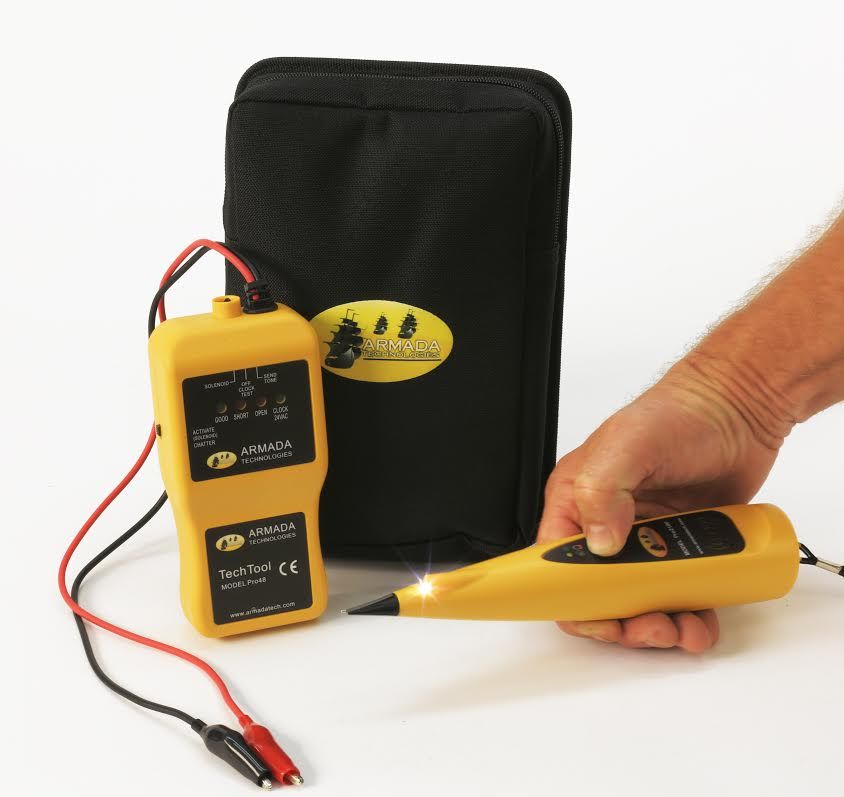
The Armada Pro48 Solenoid Activator / Chatterbox (on left) and Pro210f Tone Probe (right)
The Armada Pro48 is small enough to carry around easily, but big enough to not be easily left behind. It is constructed of heavy yellow plastic and powered by two 9-volt alkaline batteries. The unit has two heavy-duty wire leads with multifunction wire connectors on the end of each wire. The connectors allow it to attach to screw heads, metal tabs, wires, and even has a barb to pierce through wire insulation. A toggle switch enclosed in a protective sheath on top of the unit sets the function. A slide-switch on the side of the Pro48 switches between the solenoid activation and chatter modes. The Pro48 has a limited one-year warranty. The average homeowner doesn't need anything fancier than the Pro48 and this would be my recommendation for a homeowner looking for a top-quality troubleshooting tool.
There is a limitation to the length of wire that can be tested with the Pro-48. The limitations are based on wire gauge (size) and are:
#12 AWG wire = 3000-13000 feet
#14 AWG wire = 2000-8500 feet
#18 AWG wire = 500-3000 feet
Note- under good conditions and with brand-new batteries the longer wire lengths can be tested, the shorter lengths are the worst-case scenario with weak batteries. Most home irrigation systems use #18 AWG wire and typically this wire is color coded.
The Pro48 is sold as a stand-alone unit or as part of a kit (Pro48K Solenoid Activator/Chatterbox Kit) that includes the Pro210f Tone Probe. In order to use the tone function to identify wires you need to have both the Pro48 and the Pro210f Tone Probe.
Pro210f Tone Probe / Pro220K Tone and Probe Kit
The Armada Technologies Pro210f Tone Probe is used to trace and identify a single wire within a group of wires or in a multi-wire cable. The unit has a volume control and a monitor jack for use with a headset. New in the 21f model is a small LED light helps illuminate the work area and AC rejection circuitry that helps reduce interference. The Pro210f uses a single 9-volt alkaline battery. A momentary-type push-button switch turns the unit on and off, so you don't have to worry about leaving it on. The unit is constructed of heavy yellow plastic measuring 1 1/2" x 9" x 1 3/4" in size. The Pro210f is also sold as the Pro220K Tone and Probe Kit which includes a small tone sender/generator, along with the Pro210f Probe, as well as a carrying case for both. Because the wire used for small residential irrigation systems is typically color-coded cable, homeowners seldom need to trace wires. The Tone Probe is primarily a tool for contractors who install larger irrigation systems where there are multiple individual wires of the same color. I think most homeowners would find this over-kill for their use.
Pro48K Solenoid Activator/Chatterbox Kit w/ Probe
This is a combination kit that includes all the items reviewed on this page. The kit includes a Armada Pro48 Solenoid Activator / Chatterbox, a Pro210f Tone Probe, and a carrying case for both the units. (The Pro48K Solenoid Activator/Chatterbox Kit is what I use in my work and would recommend for pro installers.)
What Can You Use These Tools For, and How Do They Work?
If you're not an irrigation professional you're probably asking what do you do with these tools and how do you do it? Good questions! Here's what you can do with them:
- Test irrigation controller output. The Armada Pro48 can be used to check the output of an irrigation controller (clock). You simply connect the Pro48 to the controller using the leads and turn on the controller station you wish to test. A light on the Pro48 will tell you if the controller is sending the proper signal for the valve.
- Test valve wires. The Armada Pro48 can be used to determine if the wires between the controller and the valve are shorted or broken. Connect the Pro48 to the wires at the irrigation controller. The Pro48 will indicate if the wires are good, shorted out, or if the circuit is open. If the circuit is open, the Pro48 can then be used to test the solenoid and determine if the problem was a broken wire or bad solenoid.
- Activate a valve solenoid. The Armada Pro48 can be attached to a solenoid valve and used to activate the solenoid. This allows you to turn on the solenoid valve without using the controller.
- Test a valve solenoid. When the solenoid is activated by the Armada Pro48 a light on the Pro48 will also tell you if the solenoid is good. If the Pro48 indicates a short or an open circuit, the solenoid is bad. If the Pro48 indicates the solenoid is good, but the valve did not open it, that means the solenoid plunger is stuck or there is a non-solenoid problem inside the valve.
- Locate a solenoid valve. The Armada Pro48 can be used to find some solenoid valves. It does this by "chattering the solenoid" on the valve. Chattering means it turns the valve solenoid on and off at about one second intervals. Each time the solenoid is activated it makes a clicking noise. So when chattered, the valve makes a clicking noise. Listening for this chattering noise can help you find the valve. You simply hook the Pro48 up to the valves wires, turn it on chatter mode, and listen for the valve chattering. It is important to note that there are some limitations to this feature. Chattering will not work if the valve solenoid is broken or if the wires to the valve are broken. Different valve models make different levels of noise when you turn them on and off. Some models are very quiet, while others could wake the dead. The usefulness of this feature is directly related to how loud the valve is. If the valve is installed above ground or is in a underground box you can usually hear it chattering. If the valve is buried under a few inches of dirt you will probably NOT be able to hear it.
- Wire identification. The Armada Pro48 contains a "tone sender/generator". When used in conjunction with the Pro210f Tone Probe it can be used to identify a single wire within a group of identical wires. The tone generator is connected to one end of the wire and to an earth ground. When placed adjacent to the same wire, the Amplifier Probe makes a alternating pitch sound like a European police siren. This allows a single wire in a group to be identified from the other wires. A couple of warnings: This is a low power tone generator, and is not a suitable underground wire tracing tool; it can't be used to find a buried wire. It also takes practice and patience to master the use of a tone detector. Tone detection is considered as much an art as a science. Because of this I have included some instructions and suggestions on using the tone generator at the end of this review.
Testing the Units:
In my tests both the Armada (formerly Pro-Tech) Pro48 and the Pro210f Tone Probe performed well when used with fresh, alkaline batteries. I did notice a distinct drop in performance when using an older set of batteries. The chatter and valve actuation features use up batteries quickly, so be sure to have some extra batteries on hand. The wire connectors on the Pro48 include a wire insulation piercing barb so you don't have to strip the wire to attach the tester, which is very handy. However I recommend that you do not use this feature for outdoor wire or wire that will be buried, unless you seal the hole created in the insulation after you're done. Test equipment tends to see a hard life, so I tested these tools with a 30 inch drop onto a concrete floor (about hand level when carrying them). The Pro210f Tone Probe survived the drop onto the concrete floor with no damage. The Armada Pro48 did not do as well, the battery compartment door broke when dropped (the latching tab that holds the door in place broke off). The damage was to the case only, the Pro48 continue to operate correctly after it was dropped.
Conclusion:
I found the Armada Pro48 and the Pro210f Tone Probe both functioned well. I actually use the Pro48 when I am testing valves and controllers for my reviews as well as in my normal work on irrigation systems. So these are products I personally use and recommend. (I always cringe a little when doing an intentional drop test on a piece of equipment that I like and use myself. I was a bit disappointed that the battery door on the Pro48 case broke when it was dropped. I have it taped back on. I suggest you take care not to drop yours!)
Armada's webpages for these products are at:
Pro48K Solenoid Activator/Chatterbox Kit
Pro48 Solenoid Activator/Chatterbox
Pro220K Tone and Probe Kit
Tips on Using the Armada Pro48 Tone Generator with the Pro210f Tone Probe
Let's say you have a bundle of 10 wires leading from the irrigation controller to a location 100 feet away where you want to install your valves. All the wires are identical; same size, same color. How do you tell one wire from the other? You can use the tone sender/generator feature of the Armada Technologies Pro48 with the Armada Technologies Pro210f Tone Probe for this.
- The black lead of the Pro48 is connected to an earth ground, such as a water pipe, electrical ground, or even a screwdriver stuck in the ground will often work. You may need a length of spare wire to reach a suitable ground, especially inside a building. (Be careful if you use the ground wire on an electrical circuit or outlet; don't connect the tester to a standard or high voltage wire by accident! Check for voltage on the wire first.)
- The red lead of the Pro48 is connected to one end of the wire you wish to identify.
- Switch the top toggle switch on the Pro48 to the "send tone" position. The tone generator will send a tone signal on the wire you connected the red lead to.
- Test the connection by placing the Pro210f Tone Probe's antenna tip next to the wire you are identifying. Press the button on the probe and adjust the volume dial until you hear a siren tone emitted from the Amplifier Probe. The siren should fade out as you move the tip away from the wire. The siren should not go off or be noticeably quieter when you touch the probe tip to any other wires. Continue to adjust the volume until you get the siren at a level where you can easily tell the difference in volume between the wire connected to the red lead and the other wires. (If you are not able to get a noticeable difference in volume between the wires, see the work-around instructions below.)
- Now go to the other end of your group of wires. Separate the wires a few inches from each other and use the Amplifier Probe to identify the wire with the tone. While pressing the trigger on the Amplifier Probe touch the antenna tip of the probe to each wire and listen for the siren. The wire with the tone will sound the loudest. You may need to adjust the volume on the Amplifier Probe to be able to clearly tell which one is louder. Another trick that sometimes works is to hold the Amplifier Probe in one hand and touched the wires with your other hand. It takes a bit of practice.
- Don't forget to turn off the Pro-48 when you are finished!
Testing for a tone on wires that are installed very close to each other can be very difficult. This is a common problem with #18 wires, twisted-wire cables, multi-wire cables, and any low-voltage wire with thin insulation. This is caused by the tone signal leaking between the wires. In many cases it is just about impossible to tell which wire the tone is attached to. There is a work-around solution that you can try, however.
Work-Around Instructions for Difficult Situations-
- Attach the red lead of the Pro48 to the wire you wish to identify. Place a small piece of masking tape on this wire to identify it.
- Attach the black lead of the Pro48 to another one of the wires in the group, do not attach it to an earth ground.
- Switch the top toggle switch on the Pro48 to the "send tone" position.
- Now go to the other end of your group of wires. Separate the wires a few inches from each other and use the Amplifier Probe to identify the wires with the tone. When touched with the probe the two wires you connected the Pro48 to should give a much louder siren sound than the other wires. Place a small piece of masking tape on each of those two wires.
- Go back to the other end of the wire group where the Pro48 is connected. Disconnect the black lead of the Pro48 from the wire it was attached to and reconnect it to a different wire in the group.
- Return to the other end of the wires and retest them using the Amplifier Probe. One of the wires you put masking tape on will still give a loud siren tone. The other should not. Remove the masking tape from the one that no longer has a loud siren tone.
- The wire you wanted to identify now has masking tape on both ends of it.
- Don't forget to turn off the Pro-48 when you are finished!